


 Payroll







Group Shift Booking for Recruitment Agencies
Book a client’s related shifts as one group, then fill, track and change them from one view across every date, time, location and role.
Manage Every Shift in One Place
Create and manage multiple related shifts as one booking. Whether you’re filling recurring shifts, rotas or large staffing requirements, Group Shifts gives you one clear view across every date, time, location and role.
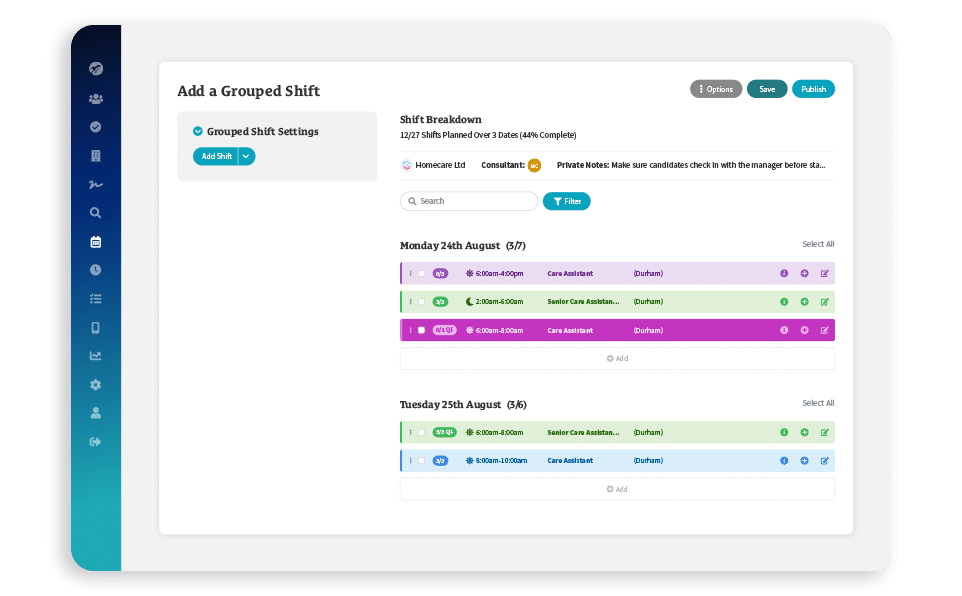
Each group holds the client, the consultant responsible and any private notes, and the shift breakdown shows how far the booking has got, for example 12 of 27 shifts planned over 3 dates, 44% complete. Group Shifts is part of Mobile Rocket’s shift booking software.
How Group Shift Booking Works
Set up a client’s booking once, then fill and track every shift in it together.
- Set up the group: Choose the client and the consultant responsible, and add any private notes for the booking.
- Add every shift: Add each shift by date, with its time, role and location. Day and night shifts and different roles can sit in the same group.
- Fill the vacancies: Assign candidates yourself, send the remaining vacancies to Quick Fill, or do both. Candidates see the shift details in your branded recruitment app and accept.
- Track and adjust: The shift breakdown shows what is filled and what is outstanding on every date. Change one shift or add more without disrupting the rest of the booking.

Fill Vacancies Faster
Quickly see what’s filled, what’s outstanding and where action is needed. Assign candidates manually, use Quick Fill for remaining vacancies, or combine both approaches to get every shift covered sooner.
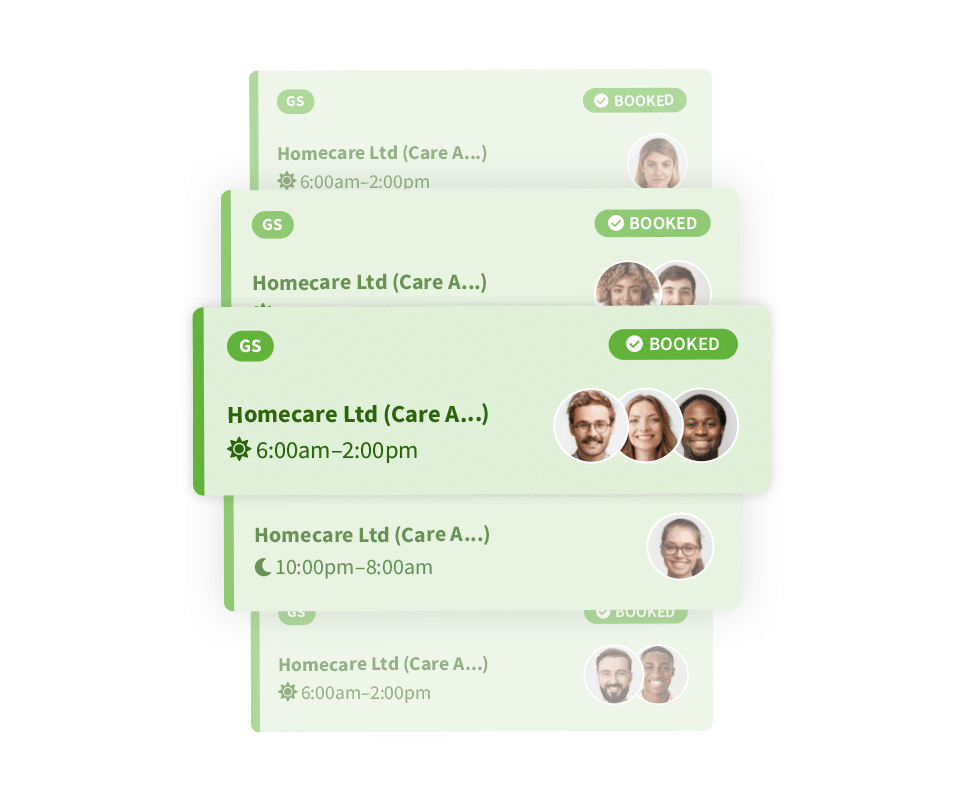
Each shift shows how many candidates are booked against the number needed, such as 0/3, and shifts sent to Quick Fill are marked QF. Quick Fill asks suitable candidates if they are available, by push notification. Once filled, a shift is marked Booked with its candidates.
Stay in Control as Plans Change
Adjust individual shifts without disrupting the wider booking, increase staffing requirements when demand grows and manage changes quickly from one central view. Group Shifts gives recruiters the flexibility to respond faster while keeping every booking on track.
Open any shift in the group to see its candidates and how many places are filled, make the change and save it. When the client needs more cover, add another shift to any date in the group.

When Agencies Use Group Shifts
Group Shifts suits any client who needs several shifts covered together:
- Recurring shifts: The same role on set days, booked once as one group instead of shift by shift.
- Rotas: Day and night cover for the same client, such as care assistants by day and senior care assistants overnight.
- Large staffing requirements: Many shifts over several dates, such as 27 shifts across 3 dates for one homecare client, tracked until every place is filled.
- Mixed roles and locations: Different roles and sites for one client, side by side in one view.

How Group Shifts Differs From Bulk Assign and Quick Fill
Shift Manager has three features for handling more than one shift. Each does a different job:
| Feature | What it does | Use it when |
|---|---|---|
| Group Shifts | Books a client’s related shifts as one booking and shows what is filled and outstanding on every date. | A client needs recurring shifts, a rota or a large requirement covered. |
| Bulk Assign Candidates & Clients | Bulk shift assignment puts available candidates onto many shifts in one action, filtered by location, role and shift type, with drag and drop. | Many shifts need candidates assigned at once. |
| Quick Fill Shifts | Asks suitable candidates by push notification if they are available for a shift. | A shift needs filling quickly, or a few places in a group are still open. |
Inside a group, assign candidates yourself and send any remaining vacancies to Quick Fill.
Join 2,000+ Consultants Who Use Us Every Day







Discover the Other Features of Shift Manager


Questions Agencies Ask About Group Shift Booking
What is group shift booking?
Group shift booking means booking several related shifts for one client as a single booking, instead of creating and tracking each shift on its own. In Mobile Rocket’s Group Shifts, every date, time, location and role sits in one view, the shift breakdown shows how much of the booking is filled, and consultants fill the shifts themselves, with Quick Fill, or both.
Can one group include different roles and shift times?
Yes. A group can hold shifts on different dates, at different times and for different roles, such as care assistant day shifts and senior care assistant night shifts for the same client. Each shift keeps its own time, role and location, and roles set up once in shift rates and roles are reused for every future booking.
How do candidates hear about shifts in a group?
Through your agency’s branded app. Candidates assigned to a shift receive the shift details on their smartphone, including the role, shift type and rate, and can accept it. For shifts that are still open, Quick Fill sends push notifications asking suitable candidates if they are available, filtered by their skills and whether they have worked for the client before.
What happens once the shifts have been worked?
Shift Manager works with Mobile Rocket’s online timesheets. Candidates clock in and out of each shift on their smartphone, clients approve the timesheets, and approved hours flow straight into payroll. Agencies can also filter weekly shift reports by client, candidate or department to see the total charge, total margin and average shift duration.
Which Mobile Rocket plans include Group Shifts?
Group Shifts is one of the Shift Manager features, and Shift Manager comes with the Starter, Growth and Scale plans, alongside the App, Compliance, CRM and Timesheets. The plans differ by team size and candidate numbers: Starter covers 3 users and 200 candidates, Growth 4 to 10 users and 1,000 candidates, and Scale 11 or more users with unlimited candidates.
All-in-one Shift Management to Save Time & Place More Candidates
Call us on +44 (0)1325 633 287 or email sales@mobilerocket.co.uk