


 Payroll







Bulk Shift Assignment Software for Recruitment Agencies
Filter candidates by availability, location and role, assign them to open shifts with drag and drop, and every candidate booked is notified on their phone.
Candidate Availability
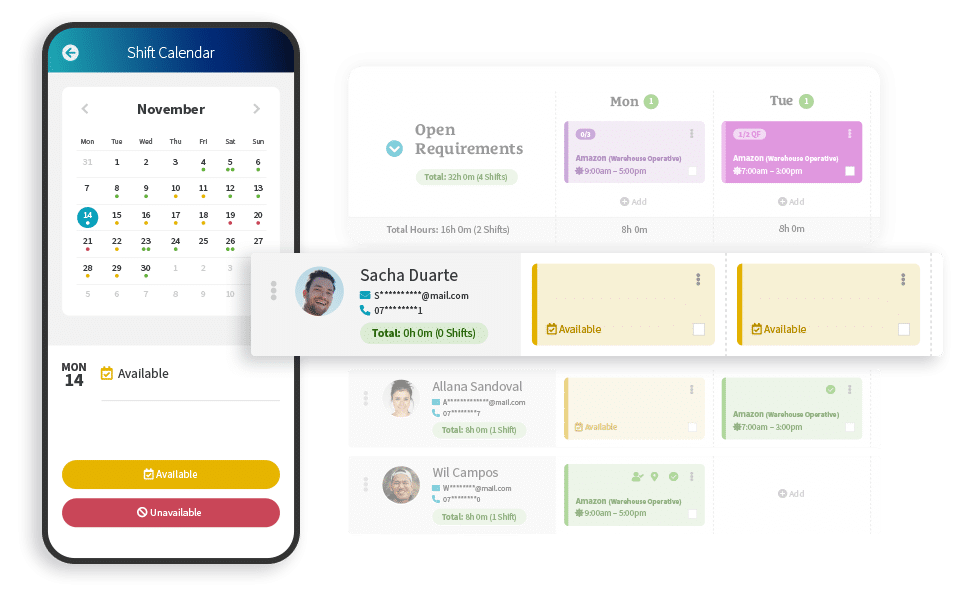
Rocket’s Bulk Assign Candidates & Clients feature works alongside real time candidate availability, giving consultants visibility of who’s ready to work. Candidates update their calendars directly in your branded app, allowing agencies to filter availability inside the shift manager calendar and move quickly when assigning work.
On their phone, candidates mark each day as available or unavailable, and an automatic reminder asks them to update the week ahead on a day you choose. Available candidates then show beside the open requirements, ready to assign.
Candidate Bulk Assign
Assign multiple shifts to available candidates in one action instead of booking people individually. Shift types are applied automatically and candidates receive instant push notifications when booked, helping agencies fill roles faster while reducing repetitive admin.
Each notification gives the client, date and time of the new shift, and the candidate opens your branded app to confirm it. Because roles, pay rates and shift types are set up once in Shift Manager, every candidate booked sees the right shift rates and roles on their phone.

Client Bulk Assign
Filter by location, role and shift type to surface suitable candidates, then bulk assign with a simple drag and drop. This makes it easy to match clients with available staff at speed, streamlining large bookings and helping consultants respond quickly to high volume requirements.
Candidates and clients can be assigned to roles, shift types and locations in bulk. Tick the client roles you need, or Select All, drag them across and press Assign, then manage them in the calendar view.

How to Bulk Assign Shifts, Step by Step
Bulk assigning happens in the Shift Manager calendar, using the roles, rates and shift types your agency has already set up.
- Open the requirements: The calendar shows each day’s open requirements still to fill, by client and role.
- Filter the candidates: Filter by availability, location, role and shift type. Skills and compliance show before you assign.
- Drag and drop: Pick the shifts and the candidates, then drag and drop to assign multiple shifts in one action.
- Shift types added automatically: Each booking takes its shift type, with the pay rate set for it.
- Candidates confirm: Every candidate booked gets a push notification and confirms the shift in your branded app.
Booked shifts stay in the calendar view to manage, and Shift Manager integrates with online timesheets for the hours worked.

Fill Next Week’s Shifts in One Go
Regular bookings don’t have to be built shift by shift. Clients can add recurring shifts, and you can assign the week’s open requirements to filtered candidates in one action. Or tell Rocket AI what next week needs: it turns that one instruction into open requirements, matched workers and candidate messages, and assigns candidates to shifts ready for one-click publishing, while your team stays in control.

When to Use Bulk Assign, Group Shifts or Quick Fill
Bulk Assign is one of seven features in Mobile Rocket’s shift booking software. Three of them help you fill more than one shift:
| Feature | Use it when |
|---|---|
| Bulk Assign | You are booking many shifts at once: filter available candidates by location, role and shift type, then assign multiple shifts in one action. |
| Group Shifts | One booking holds many related shifts, such as recurring shifts, a rota or a large requirement, and you want one view of what is filled and outstanding across every date, time, location and role. |
| Quick Fill | A shift needs filling quickly: ask candidates by push notification if they are available, filtered by whether they have worked for that client before and have the skills for the role. |
They also work together: in Group Shifts you can assign candidates yourself and use Quick Fill for any remaining vacancies.
Join 2,000+ Consultants Who Use Us Every Day




Discover the Other Features of Shift Manager


Questions Agencies Ask About Bulk Shift Assignment
What is bulk shift assignment software?
Bulk shift assignment software lets agencies book many shifts on candidates in one action instead of one at a time. In Mobile Rocket’s Shift Manager, consultants filter available candidates by location, role and shift type, then assign multiple shifts with drag and drop. Shift types are applied automatically, and every candidate booked gets a push notification and confirms the shift in your branded app.
How do candidates know they have been booked?
Each candidate booked gets a push notification on their phone giving the client, date and time of the new shift. They open your branded app to see the shift breakdown, including the role, shift type and rate, and accept it. Candidates keep their availability up to date in the same app, so you can see who has said they can work before you book.
Can we book only candidates who are compliant?
Yes. Set your requirements across the business or for a specific role in compliance, and only candidates who meet them can be placed. Skills and compliance show in Shift Manager before you assign, and once candidates have completed their digital right to work checks, they can be assigned to shifts.
Can clients book candidates onto shifts themselves?
Yes, with client self-service shift booking. Clients add shift requests in their own portal, see who is available from a pool of candidates your agency has approved, and invite or confirm them. You decide which candidates each client can access and which roles, locations and booking window they can use, so every booking follows your rules.
Which Mobile Rocket plans include Bulk Assign?
Bulk Assign is part of Shift Manager, which comes with the Starter, Growth and Scale plans alongside the App, Compliance, e-Registration and Timesheets. The plans differ by team size and candidate numbers: Starter covers 3 users and 200 candidates, Growth 4 to 10 users and 1,000 candidates, and Scale 11 or more users with unlimited candidates. Enterprise suits agencies with several locations.
All-in-one Shift Management to Save Time & Place More Candidates
Call us on +44 (0)1325 633 287 or email sales@mobilerocket.co.uk