


 Payroll








Digital Right to Work Checks
Secure ID Checks at the Click of a Button
We have partnered with TrustID, a UK certified Identity Service Provider (IDSP), to offer simple, cost-effective digital Right to Work checks for recruitment agencies.
Every candidate’s Right to Work must be checked before they start work, as GOV.UK explains. With Mobile Rocket, candidates complete the check on their phone alongside their registration documents, and the result is pulled into your recruitment hub, so the check, the candidate record and their shifts sit in one system.

How a Digital Right to Work Check Works
Mobile Rocket’s Right to Work check software runs each check in five steps, and candidates complete their part on their phone.
- Invite the candidate. Assign the Right to Work check from your recruitment hub, on its own or with their registration documents.
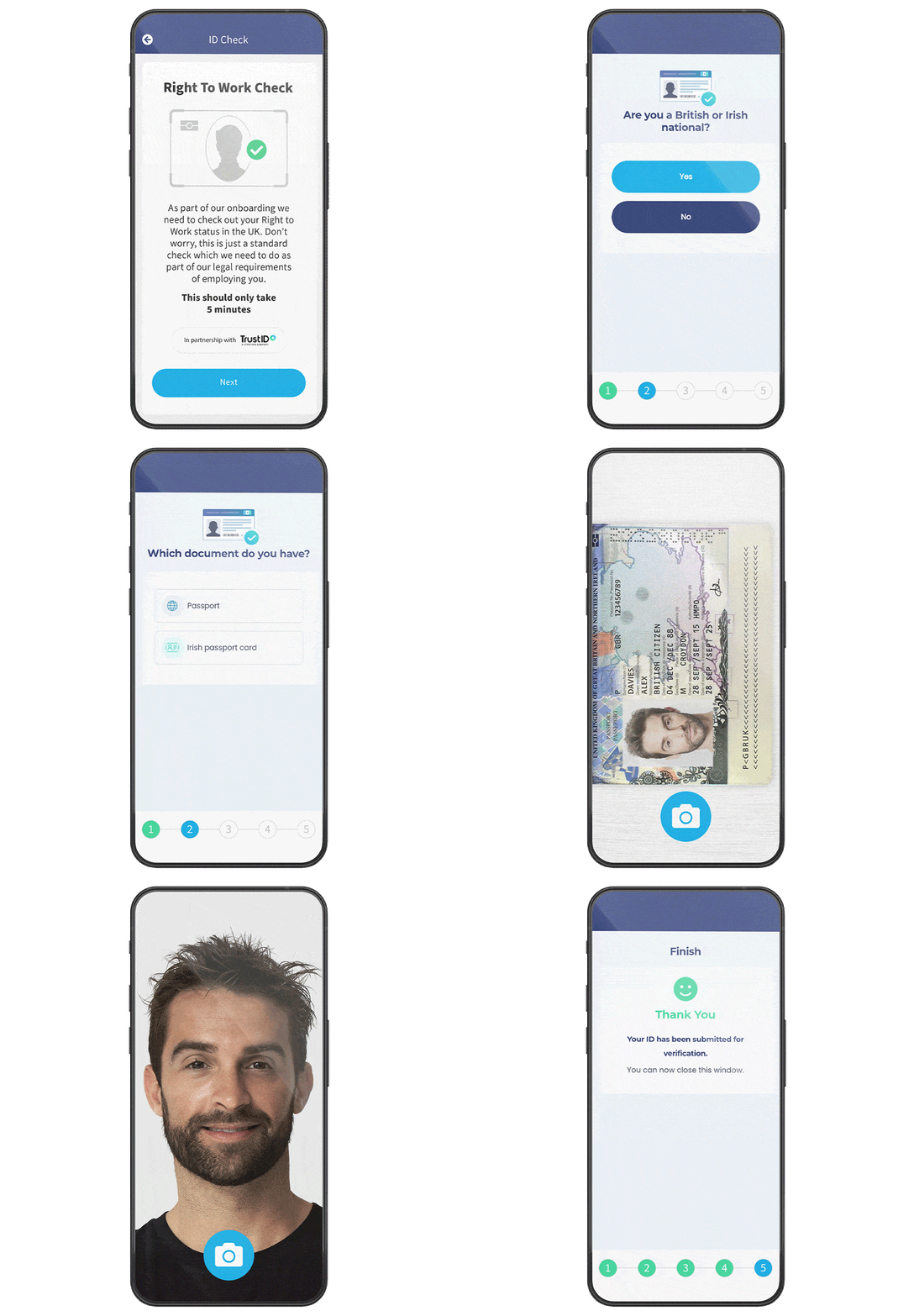
- Candidate completes the check. They photograph their in-date UK or Irish passport, or enter their share code, and take a selfie.
- Get the result. Passport checks run through TrustID and the summary reaches your hub dashboard in seconds; share code checks verify instantly if the documents are correct.
- Review and approve. Your consultant checks the photo and details belong to the candidate, then approves or disapproves them with one click.
- Keep the record. Store the verification file in your hub or export it. Keep it for as long as the candidate works for you and for two years after.
Candidates who cannot or prefer not to use a digital check can prove their Right to Work with original documents instead, as the Home Office employer’s guide explains.
Passport Checks for British and Irish Citizens
Manage and invite candidates to verify their identity through your recruitment hub. Request a photo of candidates in date UK/ Irish passport along with a selfie to verify their right to work in a matter of seconds. This will then be pulled into a summary in your hub dashboard for a secure validation check.
British and Irish citizens cannot get a share code, so their Right to Work is checked from original documents, such as a passport, or through an identity service provider like TrustID. Once the summary arrives, your consultant checks the photo and details belong to the candidate, then approves or disapproves them with one click.

Instant Validation of Share Codes
If a non-UK national has generated a share code from the home office website, a simple Right to Work check can be carried out in our system using the generated share code and a selfie. Once submitted, you will receive an instant verification if the documentation is all correct.
Biometric residence permits and cards are no longer accepted, so ask for a share code instead. Where permission to work ends on a set date, a follow-up check is due before it expires: add the expiry date to the candidate’s record and Mobile Rocket alerts your team before it lapses.

Which Right to Work Check Each Candidate Needs
GOV.UK sets out three ways to check Right to Work: through an identity service provider, online with a share code, or by checking original documents in person. The right check depends on the candidate.
| If the candidate has | Use this check |
|---|---|
| An in-date UK or Irish passport | A digital check through TrustID in Mobile Rocket: a photo of the passport and a selfie. |
| A share code from the Home Office | The share code and a selfie in Mobile Rocket, or an online check on GOV.UK’s share code service. |
| Neither, or prefers not to use a digital check | A manual check: see their original documents with them present and keep a copy that cannot be altered. |
| An outstanding application, appeal or review | Ask the Home Office to check their status, then keep the Positive Verification Notice it sends. |
The full rules, including which documents are accepted, are in the Home Office employer’s guide.
Linked to e-Registration and Shift Manager
Assign candidates Right to Work checks along with registration documents using our secure e-Registration technology to save time and fill more vacancies. Right to Work verifications can be paired with shift manager so candidates with completed checks can be assigned to shifts with ease. All verification files can then be exported and/or stored in a secured area of your recruitment hub.
Every verification file is stored against the candidate, so your team can review the evidence in a couple of clicks when an inspector or client asks for it.

ID Checks From Anywhere
Our digital Right to Work checks allow recruiters to request and validate candidates identities from any device, anywhere at any time. This saves time at the start of the recruitment process to ensure you can place candidates quicker into new available roles.

Right to Work Checks for Temp Agency Workers
When an agency engages temp workers and supplies them to clients, the Home Office employer’s guide makes the agency, as their employer, responsible for the Right to Work check. In a standard supply arrangement, the client is not expected to repeat it routinely. Ask every candidate to prove their Right to Work, British citizens included, but do not insist on one method: offer a manual check to anyone who cannot or prefers not to use a digital one. Employing someone illegally without the prescribed checks can bring a civil penalty of up to £60,000 per illegal worker. Mobile Rocket’s compliance tools keep each check on the candidate’s record, paired with Shift Manager.

What Digital Right to Work Checks Cost
Digital Right to Work checks run through TrustID inside Mobile Rocket, so candidates and consultants complete them in the same recruitment hub as the rest of onboarding. Mobile Rocket plans usually have a small one-off onboarding fee, then a monthly subscription that covers UK-based support, training and updates. See plans and pricing, or book a free demo to talk through costs for your agency.

Join 2,000+ Consultants Who Use Us Every Day




Digital Right to Work Checks FAQs
What is a digital Right to Work check?
A digital Right to Work check lets a candidate prove their identity and Right to Work remotely, through an identity service provider, instead of showing original documents in person. The Home Office employer’s guide calls these providers Right to Work digital verification service providers (DVSPs). In Mobile Rocket, candidates with an in-date UK or Irish passport send a photo of it and a selfie through TrustID.
Which candidates can have a digital check in Mobile Rocket?
Candidates with an in-date UK or Irish passport can use the TrustID passport check, and candidates with a Home Office share code can use the share code check with a selfie. Biometric residence permits and cards are no longer accepted. Candidates cannot be made to use a digital check, so offer a manual check of original documents to anyone who prefers one.
What is a share code?
A share code is generated on the Home Office website so a candidate can prove their Right to Work online. British and Irish citizens cannot get one. The candidate gives you the code, and you can check it with a selfie in Mobile Rocket or on GOV.UK’s share code service.
What if a candidate cannot complete a digital check?
Offer another way to prove their Right to Work. The Home Office employer’s guide says candidates who cannot complete a digital check, or prefer not to, should be offered a manual check of their original documents. If they cannot show documents or a share code, for example because an application or appeal is outstanding, ask the Home Office to check their status.
How long does a digital Right to Work check take?
The check itself is quick. Once a candidate has sent a photo of their in-date UK or Irish passport and a selfie, TrustID verifies their Right to Work in a matter of seconds and the summary appears in your hub dashboard. Share code checks give an instant verification if the documents are correct, and candidates can complete either from their phone.
How long should Right to Work records be kept?
GOV.UK says employers must keep a copy of each Right to Work check for as long as the person works for them and for two years after, and must follow data protection law. In Mobile Rocket, verification files are stored in a secure area of your recruitment hub against each candidate, and can be exported whenever you need them.
Simplify Right to Work Checks with our digital solution to stay compliant
Call us on +44 (0)1325 633 287 or email sales@mobilerocket.co.uk